Built for Clover POS

Turn every Clover sale into a repeat customer.

Send receipts through WhatsApp, capture customer contacts and build your own customer channel — automatically.

Payment detected automatically
Receipts sent automatically
Works on all Clover devices
Auto
Receipt delivery
Payment detected automatically
Receipts sent automatically
Works on all Clover devices
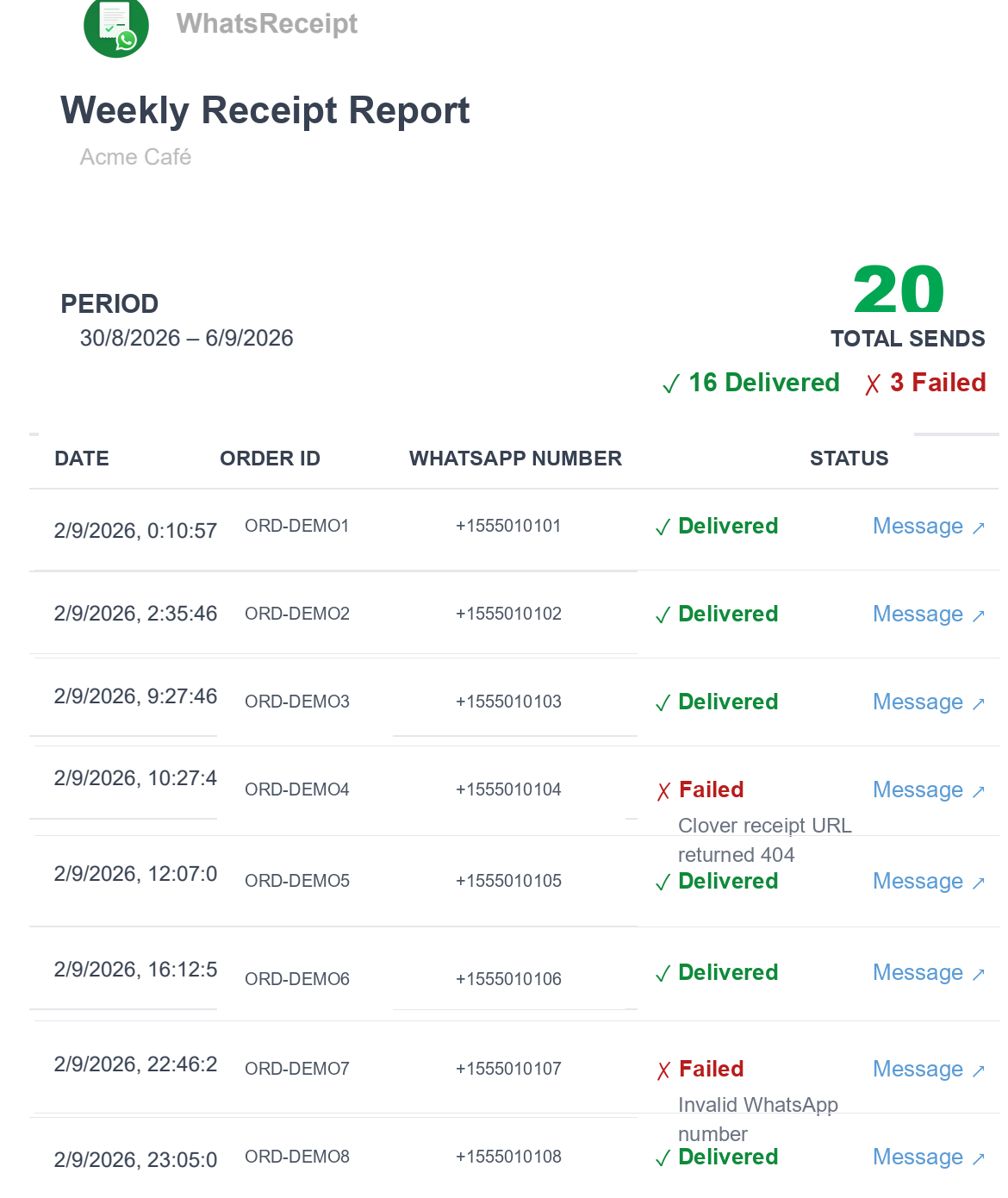
Weekly delivery report
The bigger idea

A receipt is more than proof of purchase.

It's an opportunity to start the next customer interaction.

Traditional receipt
Sale
Paper receipt
Customer leaves
WhatsReceipt
Sale
WhatsApp receipt
Customer contact
Future engagement
How it works

From Clover sale to repeat customer in four steps

No extra steps for the customer. No new behavior for the cashier. Everything happens at the natural checkout moment.

1
Customer pays

The customer completes a transaction through Clover — the payment is detected automatically.

2
Receipt goes to WhatsApp

The customer receives the receipt directly in their WhatsApp, seconds after checkout.

3
Build your customer list

Each transaction becomes part of your customer contact channel — a list you own.

4
Bring customers back

Use your channel for offers, loyalty reminders and new-product announcements.

Real product

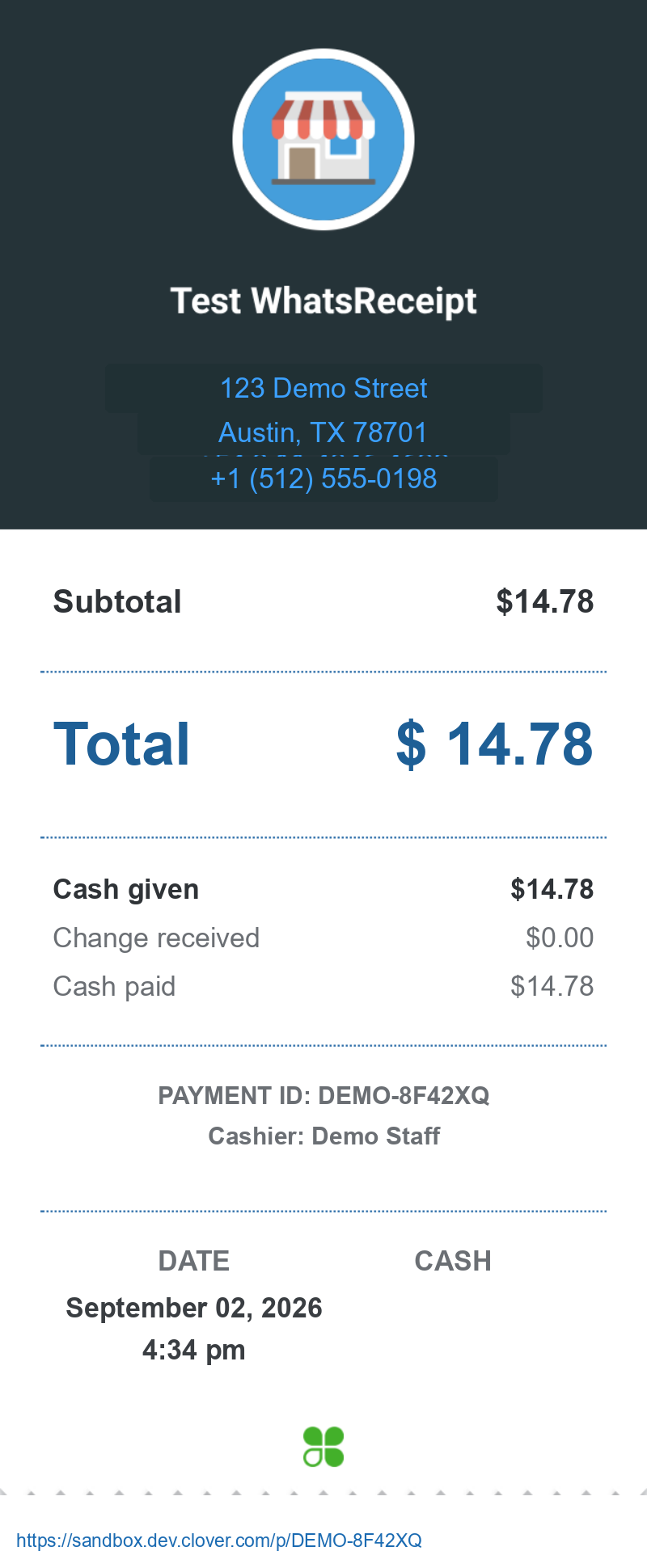
This is the receipt your customer receives.

A digital receipt delivered directly through WhatsApp, with the information customers expect from a Clover receipt.

This is the receipt your customer receives.

Illustrative example — data anonymized.

For the merchant

Know what's happening with your WhatsApp receipts.

Get a weekly report showing your WhatsApp receipt activity, including delivered, failed and pending messages.

Example weekly report
Know what's happening with your WhatsApp receipts.

Illustrative example with anonymized data — not representative of typical delivery rates.

The real value

Build your own customer channel.

Every receipt is an opportunity to grow a direct customer contact list you can use for future engagement.

Customer contacts

Build a customer contact list from your everyday transactions.

Special offers

Reconnect with customers using promotions sent to the contacts you captured.

Loyalty

Encourage customers to come back with loyalty reminders.

New products

Keep existing customers informed when you launch something new.

Not just us

Customers are already choosing messaging.

According to WhatsApp Business research across 22 markets, 73.3% of consumers surveyed prefer messaging to communicate with businesses, while 72.4% say they are more likely to purchase from a brand that offers messaging.

WhatsReceipt helps Clover merchants meet customers where they already want to communicate.

Read the full WhatsApp Business research →

Independent research by WhatsApp Business, not by WhatsReceipt.

Who is it for?

Built for businesses that want customers to come back.

Restaurants & Cafés

Turn today's receipt into an opportunity for the customer's next visit.

Retail

Stay connected with customers after the purchase.

Beauty & Salons

Keep customers connected between visits.

Local Businesses

Build a direct customer channel from everyday transactions.

The journey

From receipt to relationship.

1
Sale
→
2
WhatsApp receipt
→
3
Customer contact
→
4
Future engagement
Questions

Frequently asked questions

Everything you need to know about WhatsReceipt for Clover.

Does WhatsReceipt work with Clover?
Yes. WhatsReceipt is built specifically for Clover POS: it installs on your Clover device and detects completed payments automatically.
How does the customer receive the receipt?
Right after payment, the cashier asks for the customer's WhatsApp number, and the receipt arrives as a normal WhatsApp message seconds later.
Does the customer need to install an app?
No. The customer only needs WhatsApp on their phone — they receive the receipt like any other message.
What information does the customer receive?
The receipt shown on this page: store name and details, purchased items, total, payment method, date and a link to the official Clover web receipt.
Can I see which receipts were delivered?
Yes. WhatsReceipt sends the merchant a weekly report with every send: delivered, failed and pending, with the reason for each failure.
What happens if a WhatsApp number is invalid?
The app validates phone numbers at checkout, including international formats. If a delivery still fails, it appears in your weekly report with the reason.
Can I export customer contacts?
Your customer list belongs to you. Contact support and we'll export it for you.
Can I use the contacts for marketing?
Yes — the channel you build with WhatsReceipt is yours. As with any marketing, follow WhatsApp's policies and your local regulations about messaging customers.
Turn your next Clover sale into the beginning of the next customer interaction.

Send receipts through WhatsApp and start building a customer channel from the transactions you already have.

Support

We're here to help

Reach the WhatsReceipt team any time. We respond quickly during business hours.

Email
support@whatsreceipt.com
We reply within 24 hours
WhatsApp / Phone
+54 9 11 5148 9510
Message us anytime
Business Hours
10:00 – 18:00
GMT−3 · Monday to Friday